Tag: Azure

Deploying AI Applications to Azure Web Apps: A Practical Architecture Guide

Stuff I learned from Ignite 2025

Azure Web Apps (part of Azure App Service) remains one of the most effective platforms for hosting production AI-enabled applications on Azure. With first-class support for managed identities, private networking, and native integration with Azure AI services, it provides a strong balance between operational simplicity and enterprise-grade security.

This article walks through a reference architecture for deploying AI applications to Azure Web Apps, grounded in current guidance and capabilities as of Microsoft Ignite 2025. The focus is on real-world concerns: identity, networking, configuration, and infrastructure as code.


Why Azure Web Apps for AI Workloads

Azure Web Apps is well-suited for AI-powered APIs and frontends that act as orchestrators rather than model hosts. In this pattern:

  • Models are hosted in managed services such as Azure OpenAI Service
  • The Web App handles request validation, prompt construction, tool calling, and post-processing
  • Stateful data is stored externally (e.g., databases or caches)

Key benefits include:

  • Built-in autoscaling and OS patching
  • Native support for managed identities
  • Tight integration with Azure networking and security controls
  • Straightforward CI/CD and infrastructure-as-code support

Reference Architecture Overview
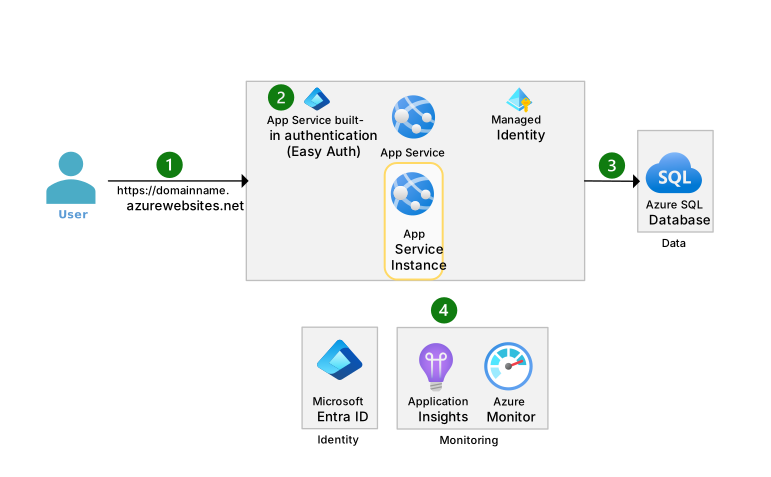
https://learn.microsoft.com/en-us/azure/architecture/web-apps/app-service/_images/basic-app-service-architecture-flow.svg
https://learn.microsoft.com/en-us/azure/ai-foundry/openai/media/use-your-data/ingestion-architecture.png?view=foundry-classic

Conceptual architecture showing Azure Web App securely accessing Azure OpenAI via private endpoints.

At a high level, the architecture looks like this:

  1. Client calls the AI application hosted on Azure Web Apps
  2. Azure Web App authenticates using a managed identity
  3. Requests are sent to Azure OpenAI Service over a private endpoint
  4. Secrets and configuration are resolved from Azure Key Vault
  5. Observability data flows to Azure Monitor and Application Insights

This design avoids API keys in code, minimizes public exposure, and supports enterprise networking requirements.


Application Design Considerations for AI Apps

Stateless by Default

Azure Web Apps scale horizontally. Your AI application should:

  • Treat each request independently
  • Store conversation state externally (e.g., Redis or Cosmos DB)
  • Avoid in-memory session affinity for chat history

This aligns naturally with AI inference patterns, where each request sends the full prompt or context.

Latency and Token Costs

When calling large language models:

  • Batch or compress prompts where possible
  • Avoid unnecessary system messages
  • Cache deterministic responses when feasible

These optimizations are application-level but directly affect infrastructure cost and scale behavior.


Identity and Security with Managed Identities

One of the most important design decisions is how the Web App authenticates to AI services.

Azure Web Apps support system-assigned managed identities, which should be preferred over API keys.

Benefits:

  • No secrets in configuration
  • Automatic credential rotation
  • Centralized access control via Azure RBAC

For example, the Web App’s managed identity can be granted the Cognitive Services OpenAI User role on the Azure OpenAI resource.


Networking: Public vs Private Access

For development or low-risk workloads, public endpoints may be acceptable. For production and regulated environments, private networking is strongly recommended.

https://learn.microsoft.com/en-us/azure/app-service/media/overview-private-endpoint/global-schema-web-app.png
https://miro.medium.com/1%2AJ3Y2zmLFxdbPnwAc4V535g.png

Private endpoint architecture eliminating public exposure of AI services.

Key components:

  • VNet-integrated Azure Web App
  • Private Endpoint for Azure OpenAI Service
  • Private DNS zone resolution

This ensures that AI traffic never traverses the public internet.


Secure Configuration with Azure Key Vault

Application configuration typically includes:

  • Model deployment names
  • Token limits
  • Feature flags
  • Non-secret operational settings

Secrets (if any remain) should live in Azure Key Vault, accessed using the Web App’s managed identity. Azure Web Apps natively support Key Vault references in app settings, eliminating the need for runtime SDK calls in many cases.


Infrastructure as Code: Bicep Example

Below is a simplified Bicep example deploying:

  • An Azure Web App
  • A system-assigned managed identity
  • Secure app settings
resource appService 'Microsoft.Web/sites@2023-01-01' = {
  name: 'ai-webapp-prod'
  location: resourceGroup().location
  identity: {
    type: 'SystemAssigned'
  }
  properties: {
    serverFarmId: appServicePlan.id
    siteConfig: {
      appSettings: [
        {
          name: 'AZURE_OPENAI_ENDPOINT'
          value: 'https://my-openai-resource.openai.azure.com/'
        }
        {
          name: 'APPLICATIONINSIGHTS_CONNECTION_STRING'
          value: appInsights.properties.ConnectionString
        }
      ]
    }
  }
}

This approach keeps infrastructure declarative and auditable, while relying on Azure-native identity instead of secrets.


Terraform vs Bicep for AI Web Apps

AspectBicepTerraform
Azure-native supportExcellentVery good
Multi-cloudNoYes
Learning curveLower for Azure teamsHigher
Azure feature parityImmediateSometimes delayed

For Azure-only AI workloads, Bicep offers tighter alignment with new App Service and Azure AI features. Terraform remains valuable in multi-cloud or heavily standardized environments.


Observability and Monitoring

AI applications require more than standard HTTP metrics. At minimum, you should capture:

  • Request latency (end-to-end)
  • Token usage (where available)
  • Model error rates
  • Throttling or quota-related failures

Azure Web Apps integrates natively with Application Insights, enabling correlation between HTTP requests and outbound AI calls when instrumented correctly.


Deployment Checklist

  • Azure Web App deployed with managed identity
  • Azure OpenAI access granted via RBAC
  • Private endpoints enabled for production
  • Secrets removed from code and configuration
  • Application Insights enabled and validated
  • Prompt and token usage reviewed for cost efficiency

Further Reading

  • Azure Web Apps overview – Microsoft Learn
  • Azure OpenAI Service security and networking
  • Managed identities for Azure resources
  • Private endpoints and App Service VNet integration
  • Infrastructure as Code with Bicep

Deploying AI applications to Azure Web Apps is less about model hosting and more about secure orchestration. By combining managed identities, private networking, and infrastructure as code, you can build AI-powered systems that are scalable, auditable, and production-ready without unnecessary complexity.

I hope you found this article useful.


Tags:


Using VS Code Beast Mode to learn

Subscribe to continue reading

Subscribe to get access to the rest of this post and other subscriber-only content.


Tags:


Get TenantId for any Azure Subscription

How I Used GitHub Copilot to Write a PowerShell GUI for Azure Tenant ID Lookup

When tasked with creating a PowerShell GUI to retrieve the Azure Tenant ID for any subscription, I decided to rely entirely on GitHub Copilot. Here’s how I did it—without manually writing a single line of code myself. (repo -> https://github.com/gsuttie/getTenantIdFromAzureSubscriptionId)

Setting Up

  1. Open Visual Studio Code: My preferred development environment. I enabled GitHub Copilot for code suggestions.
  2. Define Goals:
    • A user-friendly GUI for inputting an Azure Subscription ID.
    • Backend logic to retrieve the Tenant ID using Azure PowerShell.
    • Automatically generate inline documentation and a comprehensive README file.

Prompting GitHub Copilot

  • I started by creating a new PowerShell file and inputting the following prompt for Copilot:Create a PowerShell script for a GUI that accepts an Azure Subscription ID, retrieves the Tenant ID using `Get-AzSubscription`, and displays it. Include inline comments and generate a README.
  • I then tweeked the prompt a few times and the end result can be found in the following GitHub repo

Documentation and README

I added another comment to the script:

Generate a README file explaining the purpose of this script, its usage, prerequisites, and examples.

Copilot produced a structured README covering:

  • Purpose: Explaining the script’s function.
  • Usage: Step-by-step instructions on running the script.
  • Prerequisites: Details about Azure PowerShell modules and authentication requirements.
  • Example: A sample input and output demonstration.

Testing and Tweaking

I tested the script on a sample Azure environment. While functional, the GUI layout needed minor adjustments. I prompted Copilot with:

Improve the alignment and spacing of GUI elements.

This fine-tuned the interface, making it visually cleaner.

Final Output

With GitHub Copilot, I:

  • Built a functional PowerShell GUI to retrieve Azure Tenant IDs.
  • Included inline comments and documentation.
  • Generated a detailed README without writing any code manually.

Summary

GitHub Copilot significantly accelerated the development process. While it handled 95% of the work, reviewing and testing were key to ensuring functionality and usability. This approach is ideal for tasks where speed and automation are priorities.


Tags:


Understanding and Implementing Privileged Identity Management (PIM) Using BICEP

Introduction

In today’s digital landscape, managing privileged identities has become paramount for enterprises aiming to safeguard their IT environments against unauthorized access and potential breaches. Privileged Identity Management (PIM) solutions are vital for controlling, managing, and auditing privileged access across all parts of an IT environment. In this blog post, I will delve into how to implement PIM using BICEP and the necessity of a P2 Entra license.

What is Privileged Identity Management (PIM)?

Privileged Identity Management (PIM) refers to the control and monitoring of access and rights for users with elevated permissions who have the authority to make critical changes within Azure. PIM solutions help to prevent security breaches by ensuring that only authorized users can access sensitive systems and data.

Why BICEP?

BICEP is a domain-specific language developed by Microsoft, used primarily for deploying Azure resources declaratively. It simplifies the management of infrastructure as code (IaC), offering a cleaner and more concise syntax compared to traditional ARM templates. Using BICEP to implement PIM can streamline the deployment of Azure resources that are specifically configured for enhanced security protocols.

The Role of P2 Entra Licensing

Microsoft Entra, formerly known as Azure Active Directory (Azure AD), offers comprehensive identity and access management solutions, with P2 licensing providing advanced protection features critical for PIM. A P2 license is essential for accessing premium PIM capabilities in Azure, such as just-in-time (JIT) privileged access, risk-based conditional access policies, and detailed auditing and reporting features.


//////////////////////////////////////////////////////////////////////////////////////////////////////////////////////////////
//// This script is used to elevate a group or a user to a built-in role in Azure using Privileged Identity Management (PIM)
//// The script uses the roleEligibilityScheduleRequests API to elevate the user or group to the specified role
//// The script supports the following built-in roles: GlobalAdmin, Owner, Contributor, Reader
//// The script requires the subscription ID, the principal ID of the user or group to elevate, and the built-in role to assign
//// The script also requires the start date and time for the eligibility schedule and the duration for which the eligibility is valid
//// The script creates a roleEligibilityScheduleRequests resource for each built-in role to assign
//// The script uses the subscription scope to assign the role to the user or group
//// The script uses the role definition IDs for each built-in role to assign
//////////////////////////////////////////////////////////////////////////////////////////////////////////////////////////////

targetScope = 'subscription'

param subscriptionId string

// Set the subscription scope using the subscription ID
var subscriptionScope = '/subscriptions/${subscriptionId}'

@description('The start date and time for the eligibility schedule in ISO 8601 format')
param startDateTime string = utcNow()

@description('The duration for which the eligibility is valid in ISO 8601 format (e.g., P90D for 90 days)')
param duration string = 'P90D'

@allowed([
  'GlobalAdmin'
  'Owner'
  'Contributor'
  'Reader'
 ])
@description('Built-in role to assign')
param builtInRoleType string

var role = {
  GlobalAdmin: '/subscriptions/${subscription().subscriptionId}/providers/Microsoft.Authorization/roleDefinitions/62e90394-69f5-4237-9190-012177145e10'
  Owner: '/subscriptions/${subscription().subscriptionId}/providers/Microsoft.Authorization/roleDefinitions/8e3af657-a8ff-443c-a75c-2fe8c4bcb635'
  Contributor: '/subscriptions/${subscription().subscriptionId}/providers/Microsoft.Authorization/roleDefinitions/b24988ac-6180-42a0-ab88-20f7382dd24c'
  Reader: '/subscriptions/${subscription().subscriptionId}/providers/Microsoft.Authorization/roleDefinitions/acdd72a7-3385-48ef-bd42-f606fba81ae7'
}

param principalIdToElevate string  // The principal ID of the user or group to elevate

//////////////////////////////////////////////////////////////////////////////////////////////////////////////////////////////
//// Deployment starts here
//////////////////////////////////////////////////////////////////////////////////////////////////////////////////////////////


@description('Elevate User to Reader')
resource pimAssignment 'Microsoft.Authorization/roleEligibilityScheduleRequests@2022-04-01-preview' = if (builtInRoleType == 'Reader') {
  name: guid(subscriptionScope, principalIdToElevate, role.Reader)
  scope: subscription()
  properties: {
    principalId: principalIdToElevate
    requestType: 'AdminAssign'
    roleDefinitionId: role[builtInRoleType]
    scheduleInfo: {
      expiration: {
        duration: duration
        type: 'AfterDuration'
      }
      startDateTime: startDateTime
    }
  }
}

@description('Elevate User to Contributor')
resource pimAssignment2 'Microsoft.Authorization/roleEligibilityScheduleRequests@2022-04-01-preview' = if (builtInRoleType == 'Contributor') {
  name: guid(subscriptionScope, principalIdToElevate, role.Contributor)
  scope: subscription()
  properties: {
    principalId: principalIdToElevate
    requestType: 'AdminAssign'
    roleDefinitionId: role[builtInRoleType]
    scheduleInfo: {
      expiration: {
        duration: duration
        type: 'AfterDuration'
      }
      startDateTime: startDateTime
    }
  }
}

@description('Elevate User to Owner')
resource pimAssignment3 'Microsoft.Authorization/roleEligibilityScheduleRequests@2022-04-01-preview' = if (builtInRoleType == 'Owner') {
  name: guid(subscriptionScope, principalIdToElevate, role.Owner)
  scope: subscription()
  properties: {
    principalId: principalIdToElevate
    requestType: 'AdminAssign'
    roleDefinitionId: role[builtInRoleType]
    scheduleInfo: {
      expiration: {
        duration: duration
        type: 'AfterDuration'
      }
      startDateTime: startDateTime
    }
  }
}

@description('Elevate User to Global Admin')
resource pimAssignment4 'Microsoft.Authorization/roleEligibilityScheduleRequests@2022-04-01-preview' = if (builtInRoleType == 'GlobalAdmin') {
  name: guid(subscriptionScope, principalIdToElevate, role.GlobalAdmin)
  scope: subscription()
  properties: {
    principalId: principalIdToElevate
    requestType: 'AdminAssign'
    roleDefinitionId: role[builtInRoleType]
    scheduleInfo: {
      expiration: {
        duration: duration
        type: 'AfterDuration'
      }
      startDateTime: startDateTime
    }
  }
}

To call this script you can use the below code

 az deployment sub create `
        --name $deploymentID `
        --location $location `
        --template-file ./PIM.bicep `
        --parameters subscriptionId=$subscriptionID builtInRoleType=$builtInRoleType principalIdToElevate=$principalIdToElevate `
        --confirm-with-what-if `
        --output none

I hope you find this script useful, let me know if you have any feedback on this post.


A New Adventure

I’m very excited to share with you the news that I have accepted a position as an Azure Architect at a company in the Netherlands called Intercept.

Intercept has very recently been awarded Microsoft Partner of the Year 2020 in the Netherlands beating off strong competition from 18 other companies.

Intercept are Microsoft Azure Management Elite Partners and Gold Partners in 7 areas at present which is pretty impressive.

I start my new role on September 1st, I will be working in and around Azure daily and that is what I want to be doing, so to say I am excited is an understatement.

During Covid-19 I was furloughed due to a customer not being able to support remote workers and during this time a great number of people from Twitter and LinkedIn reached out to me asking if I would be interested in working with them. I thank each and every one of you as being furloughed was not much fun but to be asked if I would like to work with you and your companies, that was neat, to say the least.

I interviewed at a number of companies and had numerous fantastic offers given to me but ultimately my new role ticked more boxes than the rest and I couldn’t say no.

The job role as well as the people I had spoken to at Intercept were the deciding factors for me.

Again thank you to everyone who reached out to me, you have no idea how much I appreciated it, beers are on me if we manage to meet in person, going forward.

So I look forward to rolling my sleeves up again and changing career direction ever so slightly. I am a renewed Azure MVP and that’s where I want to be working and learning day to day. I cannot wait to get started and helping people even more in the future.

November 2017 I set myself a goal of becoming an Azure Architect and gaining as much knowledge as I could with Azure – the exams have helped and I look forward to using Azure daily.

I remind myself that I am less than 3 years into my journey, I have a blog, YouTube channel, 11 Azure certification badges as below and I all whilst being a development manager of 10+ people and not using Azure daily.

All it takes is hard work, goals, determination and you can do anything.

Don’t forget to subscribe to my YouTube Channel and you can find me on twitter @gregor_suttie.


Tags:


DP-900 Azure Data Fundamentals

Happy to share that I sat the Beta for this exam and passed – here is a link to my study guide https://gregorsuttie.com/2020/06/09/dp-900-microsoft-azure-data-fundamentals-exam-study-guide/

Another exam done, and the data side of Azure is something I would love to explore further if I ever get the chance.

Don’t forget to subscribe to my YouTube Channel.


DP-900 Microsoft Azure Data Fundamentals exam Study Guide

Describe core data concepts (15-20%)

Describe types of core data workloads


Azure Weekly

Azure is an ever-changing platform, its amazing just how often its updated, it’s also really hard to stay up to date with the numerous new services and the changes to existing services.

It’s also very hard to keep abreast of all of the Azure news throughout the year, months and weeks.

Azure weekly is a great way to keep up to date with what’s new each and every week.

Azure weekly is brought to you by the folks from Endjin – they do a number of amazing things with Azure and are a company worth checking out.

They are up to week 264 at this time of writing this article, so what are you waiting for? – go find out what’s new recently, subscribe and don’t miss a thing going forward.

You can also contribute content to Azure Weekly, so if you have a blog post and have Azure content contact them and you may end up appearing in the weekly newsletter.

You can also follow Azure Weekly on twitter at @AzureWeekly

Please let me know what you think of Azure Weekly.


Tags:


Azure Advent Calendar wrap-up

The #azureadventcalendar was a shared idea between myself and @pixel_robots

Some quick stats as I write this: –

15,800 thousand YouTube views
15,000 website views from over 120 countries
1,300 hours of videos watched
1,200 subscribers

We set out with the idea of asking the Azure community for 25 videos / blog posts with a Christmas theme, with the idea in mind that it would give people the chance to show off their skills, learn new skills and contribute back to the community over December.

We asked people via twitter who would like to contribute to this idea in the middle of September to give people time to decide if they could manage to contribute in December (a 20-30 minute video isn’t easy, especially towards that time of year).

Before we knew it we had more than 25 filled up and it was clear that this might be a bit more popular than first thought, we increased it to 50 and before you know it we had increased it to 75. In order to avoid too many duplicate subjects we decided to cap it at 75.

Wow! 75 videos/blog post contributions would be pretty amazing.

We considered several ideas but wanted to keep it simple: –

  • Anyone could contribute
  • We could have had advertisements but kept it without as it was a community project for the community by the community and this was important to us both.

I would create the website and keep that up to date daily, and chase people for content, Richard was looking after our YouTube channel and scheduling the videos to go out at midnight.

Richard also designed the logo which I loved the second I saw it and we decided to use this as the brand and he also created video thumbnails for each video for people to use on twitter, videos and blog posts.

Now the real reason this was successful was due to the contributors, we were both blown away by the quality of content from each contributor and the Christmas theme just made it pretty cool.

Richard and I both had our Twitter and LinkedIn full with tweets and articles with the above logo in it, very regularly throughout the month which was super cool to see.

Setup
The website was basic and I was updating it daily with links to blog posts and using a very simple .Net Web app, and using Azure DevOps to build and deploy the web app to Azure, I also made use of staging slots to deploy the changes, check the links etc worked and then swapped the staging slot for production – super easy to do and well worth it.

Richard had the YouTube channel setup with the logo and scheduled the videos to be released using a schedule which was pretty sweet. He also created a thumbnail for each video for the contributor to use as they saw fit.

Highlights
The highlights for me were many, but one that stands out for me personally was seeing people who had never taken part in something like this, some had never created a blog post, many had never created a video before.

The hard part of the project was chasing people for content, especially when it was mid December and everyone is busy!

To end this post I want to mention the next project which you should keep your eye on by Joe Carlyle and Thomas Thornton called the #AzureSpringCleanup – personally looking forward to see more azure community coming together and creating awesome new content.

Please leave any feedback you have on the #azureadventcalendar below.


Azure Resource GitHub Repository

I have started a GitHub repository for a place to put the following so that the community can benefit from resources I have came across from the community.

I’m looking for others to contribute to this so that the community has a place to find helpful info – please take a look, add your study guides, useful links and more in here and help grow the useful resources we come across.

If you have an Azure Exam Study guide let me know and I’ll add a link to it from the Exam folder to your blog or create a quick pull request.

If you have any useful Azure Resources which aren’t listed then please either let me know or create a quick pull request.

I’m gong to be adding to this over time throughout the year, I’m looking for contributors so we can grow this out to be something useful to a lot of people.

Link to the GitHub Repository:- https://github.com/gsuttie/AzureResources