Category: Tools

Removing Unused Project References from within Visual Studio 2010

I have always wanted to know if there was a tool for looking at a project and removing any unused project references within a .net application. On twitter I came across a tweet from @dotnetjunky where he mentioned this project. Ref Assistant

It’s also available within the Visual Studio Gallery incase you want to add it from there. Once installed you can right-click on References and then select ‘Remove Unused References’ as below:-

Unused References ScreenShot

Once installed this will be available within any Visual Studio project you open as long as it is used within Visual Studio 2010.


How to Source Control your SQL Database

In this blog post I am going to show you how to add a SQL Server database to Subversion using Redgate SQL Source Control, the tool claims you can add your database to a source control provider such as Subversion in about 5 minutes – lets see whats involved.

I have Subversion running on my own windows 7 pc at home, I use it for testing out tools and integration with CI and so on, in future blog posts I will cover more on Continuous Integration.

I’m going to start by adding an existing database into Subversion using the SQL Source Control tool with screenshots so you can follow. I currently have Subversion installed and running on c:\svn\trunk\

Below is a screenshot of my local SQL Server

screenshot1

screenshot1

SportsStore is a local database used within one of the MVC books I have, lets add this database to Subversion using the tool now.

Create a New Folder which needs to be empty within your local repository folder, in my case my subversion folder is c:\svn\trunk\ – this is where your database scripts and data will be where your scripts in source control will be locally.

screenshot3

screenshot3

Highlight the database on the left and then select the blue text on the right which says “Link database to source control…”

The following window will pop-up, here enter the url to your repository, since mine is local I just need to add c:\svn\trunk\SportStoreDB (this is the folder your db scripts will go into), click go.

screenshot2

screenshot2

You should see the following :-

screenshot4

screenshot4

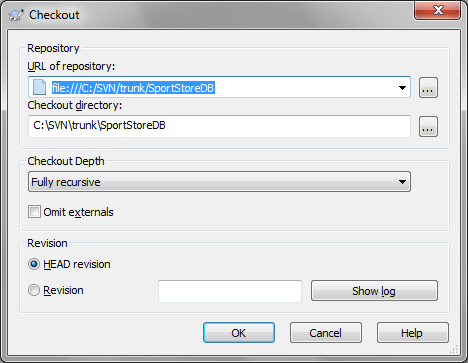
At this point the tool has added all the scripts including the data for all your tables to Subversion – now we just need to get this from Subversion into our local folder – to do this right-click on the folder and choose SVN Checkout and then click ok as below

screenshot5

screenshot5

This now leaves us with the entire SportStore database having been scripted and placed within your subversion repository and you now have a local copy – perfect and easily accomplished.

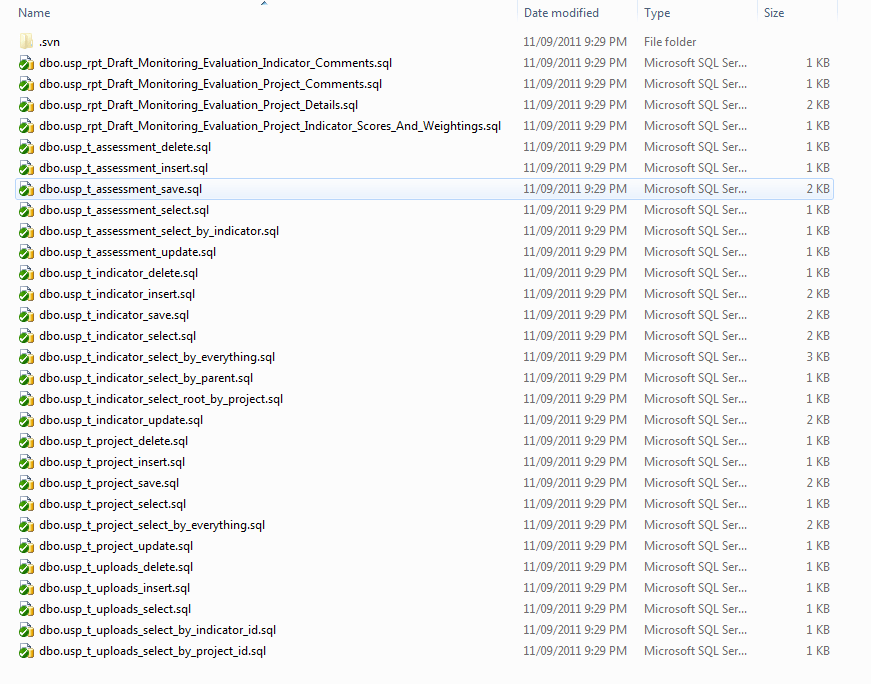
Below are the screenshots of the output from the tool within your Subversion folder.

screenshot6

And a view of the stored procedures folder with created scripts for you.

screenshot7

For more on this great tool check out Redgate SQL Source Control.


Tools of the trade

Over the years I have come across a number of tools I have used and wanted to make a note of them so that others can find them useful and so that I have a list for future reference.

The following is the list of tools I use and why I find them of use:-

    Debugging Tools

  • Red Gate Ants Profiler
    If your application is performing poorly or you want to try to work out what might not be the most efficient part of a system you can run Ants performance profiler against your code whilst it runs and this will give you some superb feedback on the slowest lines of code, and can even monitor the SQL which is being ran.
  • Fiddler
    Fiddler is a Web Debugging Proxy which logs all HTTP(S) traffic between your computer and the Internet. Fiddler has helped me with a number of issues regarding proxy authentication issues going through company firewalls as well as checking for server errors and so on, its worth spending a short time learning it as it will pay you back in the long run.
  • Glimpse
    At its core Glimpse allows you to debug your web site or web service right in the browser. Glimpse allows you to “Glimpse” into what’s going on in your web server. In other words what FireBug is to debugging your client side code, Glimpse is to debugging your server within the client
    SQL Products

  • Red-Gate Products If you’re using SQL Server a lot and you’re not using some of these products there in my opinion your missing out big time. SQL Compare, SQL Data Compare, and SQL Source Control are invaluable products.
    The products only cost a few hundred pounds and save a huge amount of time, making your developers or SQL dba’s far more productive.
      • Useful

      • AnkhSVN If you use Subversion and want to keep track of changes to your code then this add-in is very helpful and integrates with Visual Studio.