


Stuff I learned from Ignite 2025
Azure Web Apps (part of Azure App Service) remains one of the most effective platforms for hosting production AI-enabled applications on Azure. With first-class support for managed identities, private networking, and native integration with Azure AI services, it provides a strong balance between operational simplicity and enterprise-grade security.
This article walks through a reference architecture for deploying AI applications to Azure Web Apps, grounded in current guidance and capabilities as of Microsoft Ignite 2025. The focus is on real-world concerns: identity, networking, configuration, and infrastructure as code.
Why Azure Web Apps for AI Workloads
Azure Web Apps is well-suited for AI-powered APIs and frontends that act as orchestrators rather than model hosts. In this pattern:
- Models are hosted in managed services such as Azure OpenAI Service
- The Web App handles request validation, prompt construction, tool calling, and post-processing
- Stateful data is stored externally (e.g., databases or caches)
Key benefits include:
- Built-in autoscaling and OS patching
- Native support for managed identities
- Tight integration with Azure networking and security controls
- Straightforward CI/CD and infrastructure-as-code support
Reference Architecture Overview

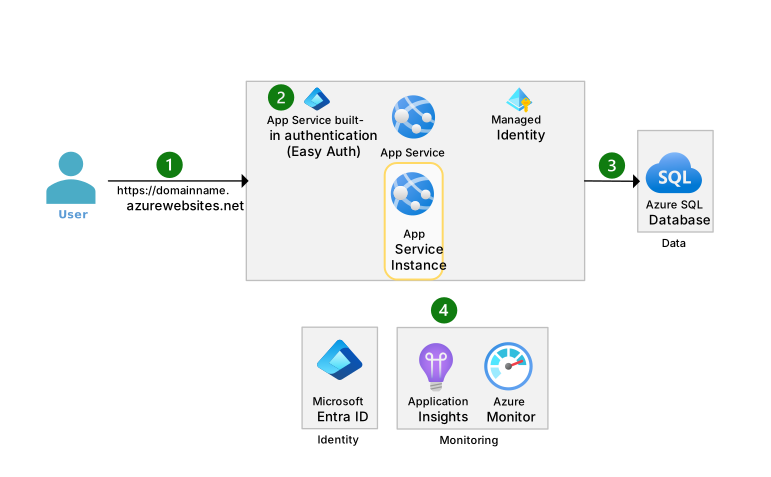


Conceptual architecture showing Azure Web App securely accessing Azure OpenAI via private endpoints.
At a high level, the architecture looks like this:
- Client calls the AI application hosted on Azure Web Apps
- Azure Web App authenticates using a managed identity
- Requests are sent to Azure OpenAI Service over a private endpoint
- Secrets and configuration are resolved from Azure Key Vault
- Observability data flows to Azure Monitor and Application Insights
This design avoids API keys in code, minimizes public exposure, and supports enterprise networking requirements.
Application Design Considerations for AI Apps
Stateless by Default
Azure Web Apps scale horizontally. Your AI application should:
- Treat each request independently
- Store conversation state externally (e.g., Redis or Cosmos DB)
- Avoid in-memory session affinity for chat history
This aligns naturally with AI inference patterns, where each request sends the full prompt or context.
Latency and Token Costs
When calling large language models:
- Batch or compress prompts where possible
- Avoid unnecessary system messages
- Cache deterministic responses when feasible
These optimizations are application-level but directly affect infrastructure cost and scale behavior.
Identity and Security with Managed Identities
One of the most important design decisions is how the Web App authenticates to AI services.
Azure Web Apps support system-assigned managed identities, which should be preferred over API keys.
Benefits:
- No secrets in configuration
- Automatic credential rotation
- Centralized access control via Azure RBAC
For example, the Web App’s managed identity can be granted the Cognitive Services OpenAI User role on the Azure OpenAI resource.
Networking: Public vs Private Access
For development or low-risk workloads, public endpoints may be acceptable. For production and regulated environments, private networking is strongly recommended.


Private endpoint architecture eliminating public exposure of AI services.
Key components:
- VNet-integrated Azure Web App
- Private Endpoint for Azure OpenAI Service
- Private DNS zone resolution
This ensures that AI traffic never traverses the public internet.
Secure Configuration with Azure Key Vault
Application configuration typically includes:
- Model deployment names
- Token limits
- Feature flags
- Non-secret operational settings
Secrets (if any remain) should live in Azure Key Vault, accessed using the Web App’s managed identity. Azure Web Apps natively support Key Vault references in app settings, eliminating the need for runtime SDK calls in many cases.
Infrastructure as Code: Bicep Example
Below is a simplified Bicep example deploying:
- An Azure Web App
- A system-assigned managed identity
- Secure app settings
resource appService 'Microsoft.Web/sites@2023-01-01' = {
  name: 'ai-webapp-prod'
  location: resourceGroup().location
  identity: {
    type: 'SystemAssigned'
  }
  properties: {
    serverFarmId: appServicePlan.id
    siteConfig: {
      appSettings: [
        {
          name: 'AZURE_OPENAI_ENDPOINT'
          value: 'https://my-openai-resource.openai.azure.com/'
        }
        {
          name: 'APPLICATIONINSIGHTS_CONNECTION_STRING'
          value: appInsights.properties.ConnectionString
        }
      ]
    }
  }
}
This approach keeps infrastructure declarative and auditable, while relying on Azure-native identity instead of secrets.
Terraform vs Bicep for AI Web Apps
| Aspect | Bicep | Terraform |
|---|---|---|
| Azure-native support | Excellent | Very good |
| Multi-cloud | No | Yes |
| Learning curve | Lower for Azure teams | Higher |
| Azure feature parity | Immediate | Sometimes delayed |
For Azure-only AI workloads, Bicep offers tighter alignment with new App Service and Azure AI features. Terraform remains valuable in multi-cloud or heavily standardized environments.
Observability and Monitoring
AI applications require more than standard HTTP metrics. At minimum, you should capture:
- Request latency (end-to-end)
- Token usage (where available)
- Model error rates
- Throttling or quota-related failures
Azure Web Apps integrates natively with Application Insights, enabling correlation between HTTP requests and outbound AI calls when instrumented correctly.
Deployment Checklist
- Azure Web App deployed with managed identity
- Azure OpenAI access granted via RBAC
- Private endpoints enabled for production
- Secrets removed from code and configuration
- Application Insights enabled and validated
- Prompt and token usage reviewed for cost efficiency
Further Reading
- Azure Web Apps overview – Microsoft Learn
- Azure OpenAI Service security and networking
- Managed identities for Azure resources
- Private endpoints and App Service VNet integration
- Infrastructure as Code with Bicep
Deploying AI applications to Azure Web Apps is less about model hosting and more about secure orchestration. By combining managed identities, private networking, and infrastructure as code, you can build AI-powered systems that are scalable, auditable, and production-ready without unnecessary complexity.
I hope you found this article useful.